

One workspace.Every service. Every team.
Bring your people, services and internal operations together. From the first request to the final resolution, keep work moving with clarity.
From request to resolution. Connected.
Request
One service entry point
Approve if needed
The right decision makers
Execute
Clear ownership
Document
Evidence stays attached
Close
A traceable outcome
One service catalog. Shared workflows. Clear responsibilities.
Different teams. One operating rhythm.
One SaaS platform for Enterprise Service Management (ESM): connect service requests, asset accountability and risk-led internal audit through shared access rules and clear ownership.
IT Services
Every request owned. Every resolution documented.
Bring service intake, approvals and support execution into one accountable workspace. Route incidents directly to IT, apply approvals where the service requires them, and carry every request through assignment, communication and documented resolution.
Explore IT Service ManagementSet target dates, track overdue requests and retain documented resolution times.
Explore the capabilities+
Direct support, or one- and two-stage approval paths configured for the service.
Conversations, private team notes, attachments and activity history remain connected to the request.
Record the action and resolution, notify the employee and retain the service history.
Connect the team. Restore the flow.
- Assigned to
- Rana N.
- Status
- In progress
- Target
- Today, 14:00
- Diagnostics completed10:24
- Connection restored11:06
- Awaiting confirmationIn progress
Illustrative product experience · sample data
Human Resources
Employee services, with a human focus.
Organize employee inquiries and document requests through configurable services, approvals and request conversations.
Explore Human ResourcesConfigure employee services in the shared catalog and keep responses and attachments with each request.
Employment letter
A service designed around the employee.
Illustrative product experience · sample data
Internal Audit
From risk assessment to verified action.
Connect risk assessment, annual audit planning, control testing and corrective action in one governed workspace. Give audit teams the context to prioritize coverage, trace evidence and follow every finding through independent closure.
Explore Internal AuditRisk-based plan suggestions remain subject to audit-manager review. Closing a finding does not automatically lower its risk assessment.
Explore the capabilities+
Assess inherent and residual exposure, then review risk-ranked annual plan suggestions.
Connect a risk and control test to its finding, action owner, target date and supporting evidence.
Use in-app deadline reminders, evidence submissions and a separate authorized closure reviewer.
Access review requires follow-up
- Linked risk
- RSK-012
- Action owner
- Operations
- Due date
- 18 Oct
- Control testedEvidence recorded
- Action submittedReady for review
- Independent reviewAwaiting verification
Illustrative product experience · sample data
Contracts & Licenses
Never miss a renewal.
Keep contracts, subscriptions, renewal periods and responsible owners in view before an expiry becomes an interruption.
Explore Contracts & LicensesManage contracts, subscriptions and government licenses, with renewal history, private documents and in-app reminders.
Workspace software
IT department · annual subscription
Illustrative product experience · sample data
Employee Requests
One front door for everyday work.
A familiar place to request help, see progress, share attachments and follow the response without losing the conversation.
Explore Employee RequestsEmployees sign in with their company employee number. An email address or phone number is not required.
What do you need today?
Find a service. Send a request. Stay informed.
Illustrative product experience · sample data
Assets & Custody
Every asset visible. Every handover accountable.
Keep asset records, custodians, branches and maintenance history connected. Move from registration to acknowledged handover, return and condition changes with clear responsibilities and a retained history of every action.
Explore Assets & CustodyOperational asset and custody management with branch-scoped permissions. Financial depreciation and automated maintenance scheduling are outside the current scope.
Explore the capabilities+
Track references, serial numbers, categories, branches, custodians and current condition.
Recipients accept or decline handovers; returns and branch transfers retain their recorded reasons.
Link reported faults to service requests and retain documented resolutions in maintenance history.
Work laptop
- Branch
- Riyadh
- Custodian
- A. Khaled
- Status
- In custody
- Asset registeredAsset record created
- Assigned to employeeCustodian recorded
- Receipt confirmedAcknowledgment retained
Illustrative product experience · sample data
Understand the risk. Strengthen the control. Verify the outcome.
Connect risk assessment, audit planning, control testing and corrective action in one governed workspace.
Focus your audit plan on assessed priorities.
Trace each finding back to its risk and control.
Verify corrective action before closing the finding.
One connected audit trail.
One front door. Every service in reach.
Turn “who should I ask?” into a clear next step. Define services by department, with the right owner and approval policy behind each one.
Discover the service catalogEmail support → IT team → Resolution
Configure service names, descriptions and approval routes to match your organization.
The next step. Already connected.
Some requests need a decision. Others need action, now. See how the route changes with the service.
- EmployeeRequest sent01
- IT departmentDirect route02
- Assigned agentWork in progress03
- ResolutionDocument the action04
- EmployeeNotify & close05
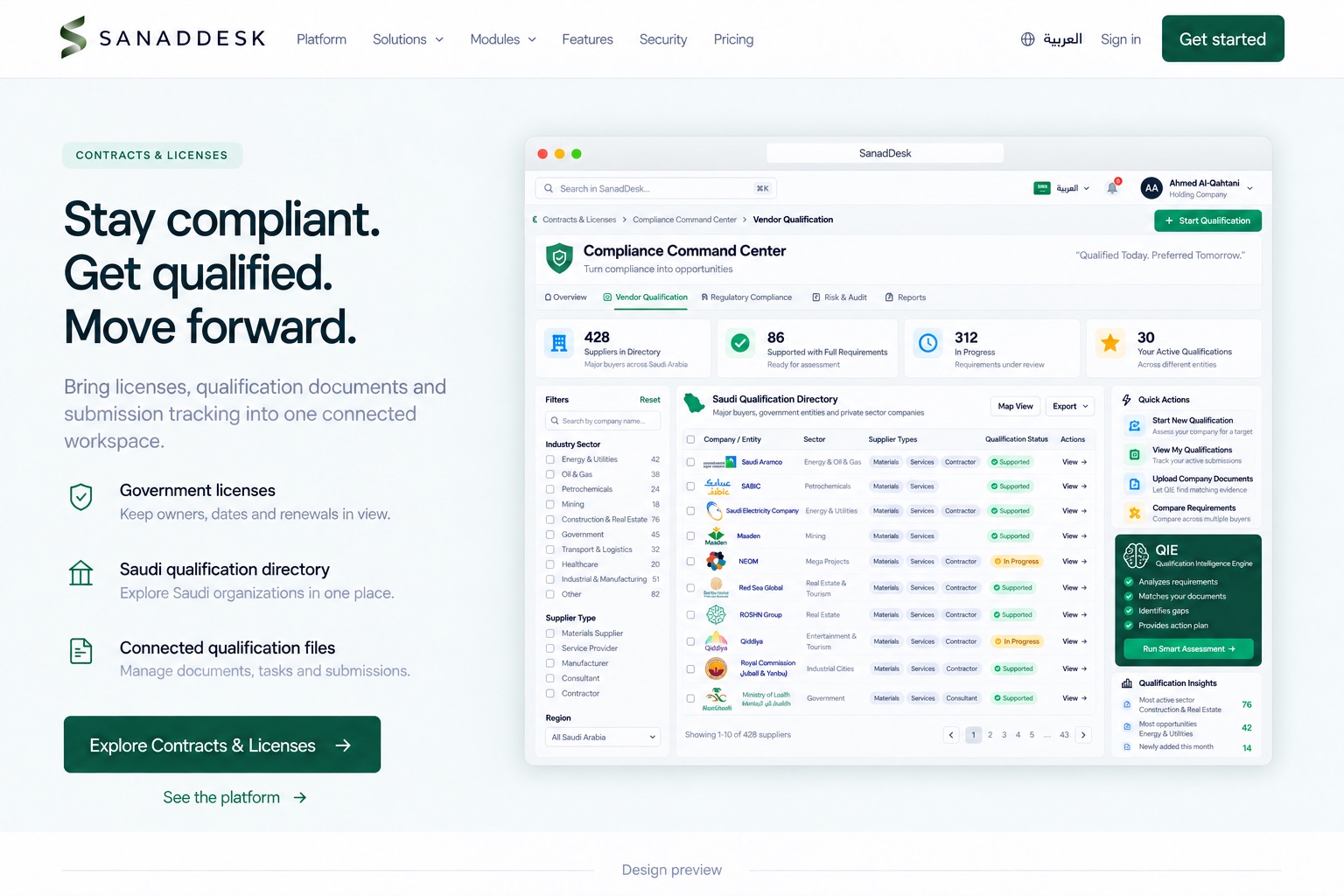
Stay compliant. Get qualified. Move forward.
Bring licenses, qualification documents and submission tracking into one connected workspace.
Keep owners, dates and renewals in view.
Explore Saudi organizations in one place.
Manage documents, tasks and submissions.
Your company. Your operating structure.
Organize employees and branch access.
Define your catalog and approval paths.
Control access by responsibility and module.
See the work. Find the friction.
Understand demand, spot delays and see where your teams need to act.
Operations overview
Workload, ownership and service progress
Service demand & delivery
7 daysRequests received and resolved across the week
Attention queue
System accessFinance review
Equipment request
Network access issue
Service workload
| Service area | Open | Resolved | Distribution |
|---|---|---|---|
| IT Support | 16 | 60 | |
| HR services | 5 | 29 | |
| Operations | 4 | 18 | |
| Contracts | 3 | 7 |
Open work by status
- In progress
- 14
- Awaiting approval
- 8
- Unassigned
- 6
Good questions. Clear answers.
Is every service approval-based?+
No. Incidents such as email and network problems go directly to support. Services can instead use one or two configured approval stages before assignment and fulfillment.
What does Sanaddesk include?+
Sanaddesk connects service requests, the service catalog, approvals, company administration, assets and custody, contracts and government licenses. Internal Audit connects risks, annual plans, control tests, findings, actions and independent closure. Vendor Qualification brings the Saudi directory, company documents, requirements, tasks and submission tracking into Contracts & Licenses.
How do employees sign in?+
Use the workspace link provided by your company administrator and your company employee number. Sign-in happens on app.sanaddesk.com, separate from this marketing website.
How are licenses and qualification managed?+
Government Licenses tracks expiry, renewals, documents and in-app reminders. Inside Contracts & Licenses, Compliance Command Center → Vendor Qualification connects directory targets, requirements, documents, tasks and submission status. Official qualification decisions remain with the relevant organization.
Great work starts with connection.
Bring clarity to every request. And momentum to every team.